Per-app colors
Assign a default RGB color to each enabled app and identify what matters at a glance.
Open-source Android app / v0.6.5
Custom RGB notification lights for the POCO X8 Pro. Give every app, contact and group its own color and animation on the back LED rings.
01 / Make it yours
Aura controls the POCO X8 Pro's rear RGB light while the screen is off. It works locally and does not require root when used with Shizuku.
Assign a default RGB color to each enabled app and identify what matters at a glance.
Use different colors and animations for contacts and groups in messaging apps.
Choose breathing, flashing, rainbow or alert effects for the right kind of signal.
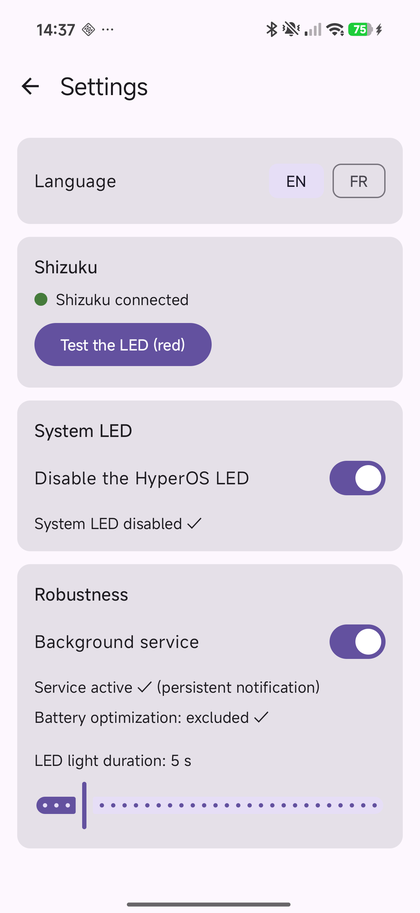
Use Shizuku and ADB-level privileges to drive the LED rings without root. Your rules never leave the phone: anonymous usage statistics are optional and off by default.
02 / Under the hood
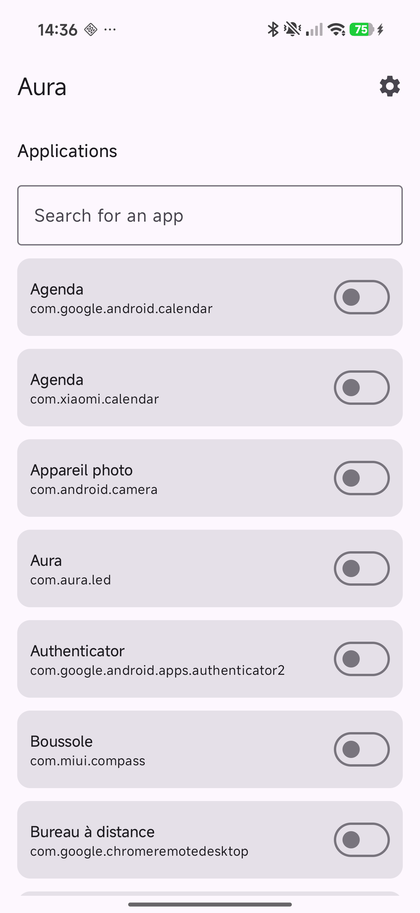
Aura stays out of the way. Set your rules once, then let the ring tell you who is calling or messaging without waking the whole phone.
03 / In the app
04 / Questions
Yes. Aura controls the back RGB LED rings and supports a color and animation for each app, contact or group notification.
Yes. Aura is developed and tested for the POCO X8 Pro running HyperOS 3. Enable the phone's back light effects first, then disable HyperOS System LED in Aura to avoid double lighting.
No. The validated setup uses Shizuku with ADB-level privileges. An experimental root fallback is also included.
The POCO X8 Pro Max, also known as Redmi Turbo 5 Max, shares the same RGB ring hardware and has been confirmed working by users. Other POCO models are not guaranteed.
Ready when you are
Download Aura, enable the back light effects in HyperOS and start building your own notification language.
POCO X8 Pro, X8 Pro Max (Redmi Turbo 5 Max) only. Aura drives the rear RGB ring, which only the Xiaomi/HyperOS family exposes: on any other phone, no notification lights anything up, with or without Shizuku.